
Inspera Update – May 2025
Colleagues, in this May Inspera update there is information on the introduction of templates which are now available for scheduling assessments; the latest release details from Inspera; a reminder on Naming Conventions as we move toward semester three; and notice of upcoming support sessions including a session on Assessment Path being delivered on campus, in Coventry, by Inspera on the 22nd May.
Using Templates to schedule assessments
Templates, to be used when scheduling assessments, have now been activated on Inspera. The value of templates is that they will help speed up and provide consistency in setting up assessments. A ‘Template’ field is now available below the ‘Test name’ input field, on the ‘Set up’ screen within the Deliver module (see image below).
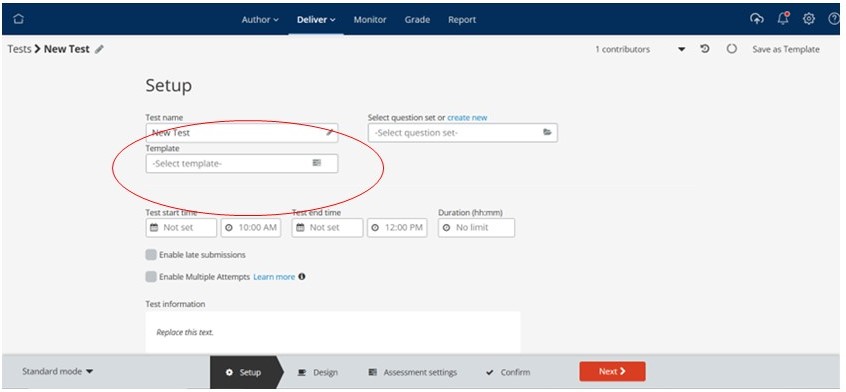
There are seven templates available based on the University assessment types. The templates are listed below, with more detail available on the Teaching Knowledge Base – Inspera Assessment Templates:
- Time Constrained Assessment (Mark Only)
- Time Constrained Assessment (Feedback)
- Formative Assessment (Single Attempt)
- Formative Assessment (Multiple Attempt)
- Core Assessment
- Invigilated Exam (Mark Only)
- Invigilated Exam (Mark and Feedback)
When you have selected your template, it is still possible to adjust the settings on your test. You can also switch templates. However, please note that as with making any changes to settings on Inspera tests once a test is active and has been started by students most settings can no longer be updated.
Please note that each Template has a creator (called Template Admin), they will be copied across to your test when you use the template. We recommend that you use the ‘Contributor’ option to remove them from your test.
The article Base Inspera Assessment Templates includes links to videos showing the student view for the different templates. Scheduling an assessment using templates is detailed further in this article.
Inspera Updates
The May updates from Inspera include two features which will require local testing before they are activated but have the potential to enhance the creation of assessments and access to data on tests in the future. These two features are:
- LTI Deeplinking – which can be used with both Inspera tests and Assessment Path. It is designed to enable tests to be created without leaving the LMS. We will need to work with Aula to test this before it is activated.
- Item Banks – the release of Item Banks will be in four phases with further updates in June, September and October. Ultimately, they will allow question banks to be shared with different users, with customisable access, and support enhanced data analysis. Use of Item Banks needs to be developed in conjunction with Organisational Units. Preparatory work defining how Item Banks will be used and what Organisational Units are required will be undertaken prior to activation.
Other updates include an updating of the list of languages to the ‘Code Compile’ automatically marked question which is currently available only on Coventry’s Inspera test server for evaluation.
Naming Conventions
As assessments are prepared for Semester 3 a reminder that with the number of questions, question sets and tests increasing on Inspera it is becoming increasingly important to ensure the naming conventions are used. These will help in locating and re-using questions and question sets by ensuring they are clearly differentiated and identifiable, which will also be important in helping to identify appropriate questions and question sets when they are moved into Item Banks.
Ensuring your assessments are appropriately named is also essential to support the Student Engagement analytics work the University is undertaking. Inspera data is being used alongside other sources to help monitor student engagement, to ensure this information can be used your assessments must use the specified naming convention which includes module code, whether the assessment is summative or formative and the semester it is running in.
The naming conventions are set out in this article – Inspera Naming Conventions.
Support Sessions
Colleagues from Inspera will be on campus in Coventry to run a workshop on Assessment Path on the 22nd May, 12.45-14.15. The session will be hybrid and you will therefore be able to join online.
Assessment Path supports continuous assessment in either a formative (assessment for learning) or summative (assessment for learning) context. It allows for the grouping of components of an assessment together to be marked individually and graded as a whole; this could include a combination of formative (zero weighted activities) and summative tasks. Hence, the potential for continuous assessment or process focused assessments which has potential to support Block delivery. For instance, all the assessments (formative and summative) planned for a module in a block or semester can be grouped together, each with its unique weight to provide an overall grade to the candidate in the module.
If you are interested in attending this session you can book via the Professional Development Booking System. Please note there are two booking links on the system, one for joining online and the other for joining in person.
There will also be a Drop in Session on the 30th May 12.00-14.00 in WM206 on Coventry Campus. This can be booked via the Professional Development Booking System or just turn up on the day.
Other sessions on offer this semester include more iterations of the Getting Started with Inspera; Feedback and Grading in Inspera; and Setting Up Inspera Assessment using a Template.
Useful links and Inspera Support Information
Inspera support links:
- Inspera landing page – Teaching Knowledge Base – https://teach.coventry.domains/inspera/
- Introducing Inspera – OTL Staff Portal
- Inspera Help Centre
- Inspera site for Students
- Includes videos demonstrating the Candidate Dashboard and link to a generic demo test
- Inspera Roll Out Plan 2024-25
