
Inspera update – April 2025
Colleagues, in this April Inspera update there is important information on the introduction of templates which can be used when scheduling assessments; the latest release details from Inspera; and notice of upcoming support sessions.
Using Templates to schedule assessments
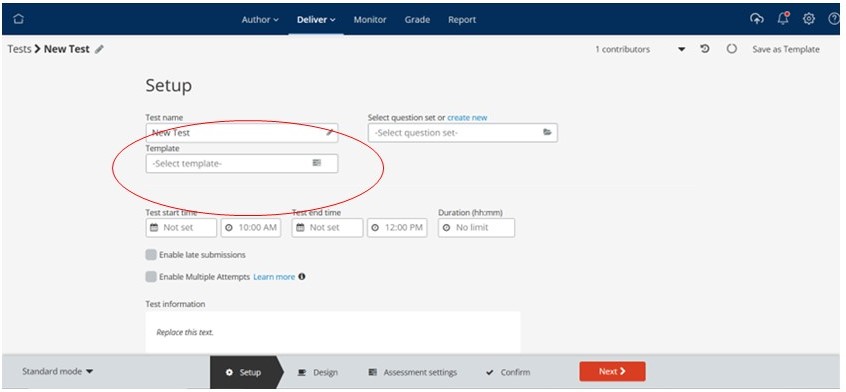
During week commencing 14th April the option to use templates when scheduling assessments will be activated on Inspera. The value of templates is that they will help speed up and provide consistency in setting up assessments. When Templates have been activated, a ‘Template’ field will appear below the ‘Test name’ input field on the ‘Set up’ screen within the Deliver module (see image below).
By clicking in the ‘Template’ field you will be presented with a list of available templates (see screen shot below).
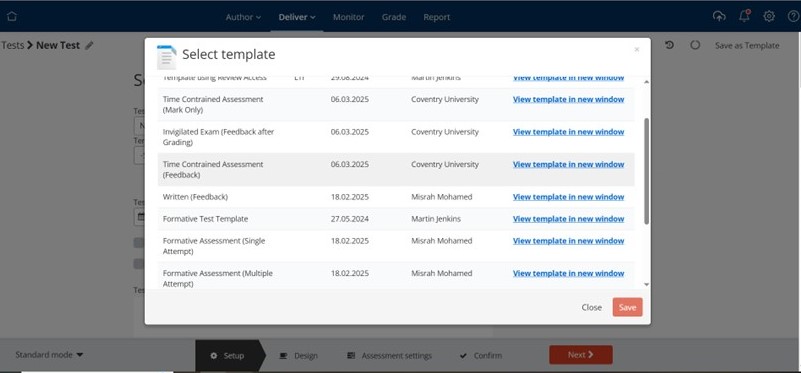
There will be seven templates available based on the University assessment types. The templates are listed below, with more detail available in this article on the Teaching Knowledge Base Inspera Assessment Templates:
- Time Constrained Assessment (Mark Only)
- Time Constrained Assessment (Feedback)
- Formative Assessment (Single Attempt)
- Formative Assessment (Multiple Attempt)
- Core Assessment
- Invigilated Exam (Mark Only)
- Invigilated Exam (Mark and Feedback)
The options that are pre-selected as part of these templates are set out in this article Creating an Inspera Assessment. When you have selected your template, it is still possible to adjust the settings on your test. You can also switch templates. However, please note that as with making any changes to settings on Inspera tests once a test is active and has been started by students most settings can no longer be updated.
Please note that each Template has a creator, they will be copied across to your test when you use the template. We recommend that you use the ‘Contributor’ option to remove them from your test.
The article Base Inspera Assessment Templates includes links to videos showing the student view for the different templates. Scheduling an assessment using templates is detailed further in this article.
Inspera Updates April 2025
Details of the updates made by Inspera as part of the April release can be viewed on their release notes page. The major changes this month are primarily administrative, providing easier access to configuration settings and more information on the planned roll out of their psychometric dashboard.
Inspera Support Sessions
A schedule of support sessions is being put together for the period April through to July. This will include Getting Started with Inspera, Feedback and Grading in Inspera and Creating and Scheduling an Assessment in Inspera sessions, please direct colleagues to these sessions or attend if a refresher would be helpful.
In addition, there will be further ‘Hands on’ drop in sessions (Coventry campus) – if you are looking for time where you can work on creating your Question Sets and tests with support on-hand then please come along to one of these sessions. You can drop in at any time during the session.
- 7th May 12.00-14.00 – JA143
- 30th May 12.00-14.00 – WM206
Useful links and Inspera Support Information
Inspera support links:
- Inspera landing page – Teaching Knowledge Base – https://teach.coventry.domains/inspera/
- Introducing Inspera – OTL Staff Portal
- Inspera Help Centre
- Inspera site for Students
- Includes videos demonstrating the Candidate Dashboard and link to a generic demo test
- Inspera Roll Out Plan 2024-25
