This guidance applies for all AULA and INSPERA assessment links for Colleges/ SHC, CUGroup and Coventry University London
Why is it important that we name links correctly?
We need to identify students who have not submitted summative assessments quickly, so that we can support students and manage good engagement with their course. To do this we need all submission links to be correctly named. Although Module teams can access this information in Inspera or AULA for their individual assessments, it is important that we are able to look at the complete picture for each student across all their modules as well as data for whole schools/ areas.
Assessment submissions for all students are either in Aula or in Inspera. Unfortunately, analysis of the information is currently difficult as there are an array of different assessment types and it is not clear from the submission link itself what the submission type is e.g., Formative or Summative, Core or Applied core. It is also not clear if all the students are intended to submit to a link or only some of the students e.g. for resit links. In Inspera we also need the module ID code to be added to the name so that we can link the assessment to the correct module.
A simple naming identifier, added to the submission link, easily highlights summative submissions from other submission links for non-summative uploads such as formative submissions or teaching activities. It also clarifies which links require all the students to submit rather than just a subset of students.
Information on submissions made in AULA and Inspera can then be downloaded by our engagement team and with the naming identifiers we can easily identify individual students who have not submitted against summative links, facilitating targeted early student support interventions.
Guidelines for setting up and naming assessment links
All submission links regardless of whether they are summative, formative or for learning on Inspera and Aula, must follow the naming identifiers described below. If you are unsure of which identifier to use please seek help from your management team or the learning technologists on how to set up links.
It is important that any summative link set up corresponds to the approved assessment defined in the Module Descriptor (MD). These can be found here
FOR INFORMATION SPECIFIC TO SETTING UP AND NAMING AULA LINKS CLICK HERE
FOR INFORMATION SPECIFIC TO SETTING UP AND NAMING INSPERA LINKS CLICK HERE
Setting up and naming AULA links
Technical guidance for how to set up links in AULA is here
When should links be set up in AULA?
In AULA Assessment information should be provided at the start of the semester/ block to students and links should also be made available for students as early as possible in the semester/ block. This allows for identifying any issues with link names before submissions and made. This also gives students the opportunity to use the links for draft submissions
and use the feedback in their work before the final submission.
How many links should be set up in AULA?
All submission links need to be meaningful and closely identified with an assessment component as per the module descriptor.
It is also important not to create multiple links for a component by splitting the submission either across several dates (e.g. Portfolio parts submitted across several weeks) or broken down by tasks (e.g. Report part one in link one, part two in link two). There should also not be different links for different groups of students (e.g. 1 link for each seminar group).
A single submission link and date should apply to all aspects of a component. The exception to this will be for group assessments where the group aspect may be submitted to one link and the individual contribution in a separate link. However, both parts must be due on the same date.
To set up Group assessment in AULA please follow the guidance here
How to manage Grace period, extensions and drafts in AULA without multiple different links
Grace period
Many assessments have a standard grace period of 24 hours after the deadline has passed when students can submit an assessment without needing an extension (there are exceptions where the grace period does not apply e.g., Time Constrained Assessments (TCA), vivas,).
The grace period is 24 hours even if that includes ‘non-working’ days such as weekends and bank holidays. If an assessment deadline is Friday at 6pm, the grace period would end on Saturday at 6pm.
For the Grace period separate submission links must not be used.
-If using Turnitin, within ‘Optional Settings’ ‘allow late submissions’ must be selected by the Module Leader.
-If using HandIn, submissions can be made after the deadline. Links can then be closed after this period by the Module Leader if required.
Extensions
Separate submissions links are not needed for students who are awarded extensions. The built-in Aula extension function can be set up by the Module Leader within the main submission link, Where a student has an extension approved by registry the module leader can attach them to the extension.
Further information can be found here.
Draft submissions
Separate links must not be set up for draft submissions. These activities are typically either formative submissions
(Formative) (e.g., feedback available) with their own link, or the main submission link is used if the purpose is for student-led reviews (e.g., upload/similarity checks). If using Turnitin, to allow draft submissions ‘Optional Settings’ must be changed by the Module Leader under the ‘Similarity Reports’ section to ‘generate reports immediately (students
can resubmit until due date)’. In HandIn, students can amend their submission until the deadline.
Please note that a student will not be able to submit a final submission during the 24 hour grace period if they have made a draft submission prior to the original deadline. Where this may impact students, please refer to local arrangements to manage the situation. Please also note that Similarity Index reports for students cannot be generated after the deadline has passed.
Naming aula links
AULA links must all have the appropriate naming identifier- see details here
Setting up and naming INSPERA links
Full technical guidance for how to set up links in Inspera is here
It is important that assessment names in Inspera include ALL of the following
| Module id | component and assessment | Specific identifier to align with the Coventry University Group | Semester or block & year [and any other distinguishing label (e.g. for resit period) |
| Unlike AULA the information from Inspera is not automatically linked to a module, so it is essential that the module code is included in the Assessment name this must be followed by a hyphen – so we can easily separate out the module id in downloads | Component identifier from Universe e.g. CW1 then brief assessment name/ type – e.g. exam, phase test | These are detailed below and appear in brackets | Use the correct format assigned to this instance in Universe and AULA In 2526 some college/ SHC modules will be moving to block delivery, so please include correct Block label e.g. 2526SEPJAN, 2526NOVJAN |
Examples
Note there must be a hyphen between the different parts of the label
- 7001XXX–CW2 exam -(Summative)–2526SEPNOV
- 5001XXX–CW1 phase test-(Resit/Deferral)–2324JANMAY-April resits
- 6001XXX–Quiz-(Formative)–2526SEP-JAN
Specific naming identifiers to be used for AULA and Inspera links
Naming identifiers are listed for each main submission type, as detailed below. When setting up the submission link, the Module Leader must add the relevant identifier (including the brackets) to the submission link title.
Please note that to enable us to use downloads of information effectively the identifier needs to be in the exact format shown below- These use brackets and word/words- please do not add anything else, including spaces, into the brackets
Applied core assessments
| Submission Type | Summative or formative? Should all student submit? | Identifier |
| Applied Core assessment – Individual. Main attempt single link which should include any draft submissions the students can use to check Turnitin, grace period and extensions Different links should not be used for different subgroups of students on the module e.g., separate link for each seminar group. This may lead to confusion over how many submissions each student should have made Examples Individual Analysis Report, CW1 (Summative) Case Study CW2 (Summative) INSPERA example 7123ABC – CW2 – exam (summative) – S3 – 2425MaySep | SUMMATIVE INDIVIDUAL- ALL STUDENTS SHOULD SUBMIT | (Summative) |
| Applied Core assessment – GROUP Individual. Main attempt single link which should include any draft submissions the students can use to check Turnitin, grace period and extensions Where one submission per group is required use the label (Group summative). This will ensure we do not contact the other group members about non-submission. [If every student in the group does have to submit, not just one group member, use the (Summative) format described above] e.g., Group Report (Group summative) e.g., Group Presentation Slides (Group summative) | SUMMATIVE GROUP- ONE MEMBER ONLY SUBMITS | (Group summative) |
| Applied core assessment – Individual main component of group assessment. Main attempt, (which should include any draft submissions the students can use to check Turnitin, grace period and extensions) Since every student should submit this should the labelling format (Summative) e.g., Individual Reflection (Summative) | SUMMATIVE INDIVIDUAL- ALL STUDENTS SHOULD SUBMIT | (Summative) |
| EXTENSIONS FOR APPLIED CORE ASSESSMENTS There should not be separate links for extensions- see information above about how to manage extensions in AULA If you need to offer extensions for INSPERA activities please liaise with your local academic manager about how to manage these | ||
| RESIT AND DEFERRED ATTEMPTS FOR APPLIED CORE ASSESSMENTS During the Resit/ deferral periods for a module instance only those students who have not already passed need to submit. To allow us to identify these links use the label (Resit/Deferral) e.g., Resit or Deferred Individual Coursework (Resit/Deferral) e.g., Resit or Deferred Case study CW2 (Resit/Deferral) INSPERA example 7001XXX–CW2 exam-(Summative)–2526SEPNOV 5001XXX–CW1 phase test-(Resit/Deferral)-2324JANMAY-April resits | SUMMATIVE RESIT/ DEFER STUDENTS ONLY | (Resit/Deferral) |
Core assessments
| Submission Type | Summative or formative? Should all student submit? | Identifier |
| CORE ASSESSMENTS For Core assessments it is important that we can identify the attempt number so that we can contact students who have missed the first submission to offer support. For subsequent submissions only those students who have not already passed are required to submit- so we need to be able to differentiate those links. In Inspera the different attempts are submitted to a single link, so it is not necessary to number them in this way- we can tell in the download if it is the students’ first, second attempt etc. Do not set up multiple links for different groups of students, e.g. one link for each seminar group. There should be a single link per attempt for all the students taking the module instance. Use the label /core and attempt number (Core/1) (Core/2) etc e.g. MCQ (Core/1) | SUMMATIVE All students should submit to first attempt- only those who still need to pass should submit to further attempts | AULA Core plus attempt number e.g. (Core/1) (Core/2) Inspera (Core) you do not need the attempt number e.g. (Core) |
| CORE ASSESSMENTS THAT ARE FOR RESIT/ DEFERRED ATTEMPTS If students failed to pass their Core assessment by the end of hte module instance they may have resit or deferred attempts in later semesters. These must be clearly labelled as resit/ defer so that it is clear that only those students need to submit | SUMMATIVE RESIT/ DEFER STUDENTS ONLY | (Resit/Deferral) |
Non-summative activities
| Submission Type | Summative or formative? Should all student submit? | Identifier |
FORMATIVE SUBMISSION WITH FEEDBACK AVAILABLE e.g., quizzes, questions, draft section It must be clear that these are not summative activities so that we can exclude these from any interventions to support submissions These should use the label (Formative) e.g., Essay plan (Formative) e.g. Lab task (Formative) Inspera example 1234ABC – quiz – (formative) – S1 – 2324SepJan | FORMATIVE | (Formative) |
| LEARNING ACTIVITIES WHERE NO FEEDBACK IS GIVEN e.g., in class activities, group meeting notes, supervision notes These should use the label (Learning) e.g., Meeting notes week 3 (Learning) | FORMATIVE | (Learning) |
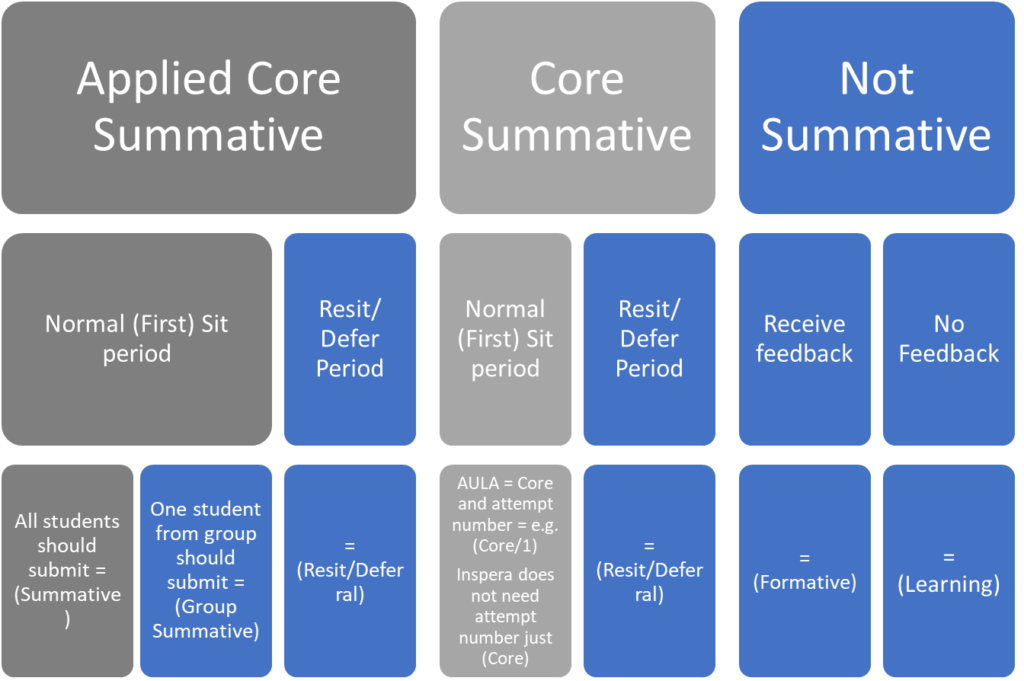
Flow diagram of which label to use
This diagram summarises which label to use in different circumstances
It is especially important thhat we can clearly identify those shaded grey, so we can offer student support