
Inspera Update – September 2025
Colleagues, please find below details of Inspera updates. Key changes this month are related to tests using multiple attempts. They include:
- Student access to Summary Pages for tests using multiple attempts, so allowing students to get enhanced feedback on scores for each attempt;
- Child tests now only being accessible through the parent test, to help reduce busyness of displays.
There have also been administrative updates linked to the forthcoming Item Bank developments, we will be continuing to work with colleagues across the University Group on how we set up Item Banks and the associated Access Groups. As further developments are due for release in October, we will not be activating Item Banks until all updates are in place. The full detail of all updates can be accessed on the Inspera Help Centre – Product Updates 2025.
Updates related to tests using Multiple Attempts
Student access to the Summary Page when reviewing their submission.
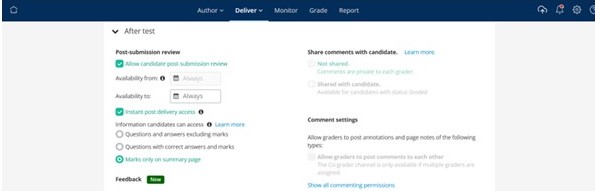
It will now be possible to allow students access to the Summary Page after each attempt, when using multiple attempts. This will show students the score they achieved for each question, so they see which questions they got correct, partially correct, wrong or which were unanswered. This option will not show the students the detail of the question.
The new feature is available as an option in the After Test area; to enable this feature under the Post Submission Review section in After Test, you will need to enable Post Submission Review, Instant Post Delivery Access and Marks only on summary page. See screen shot below or view this video:
Child Test display
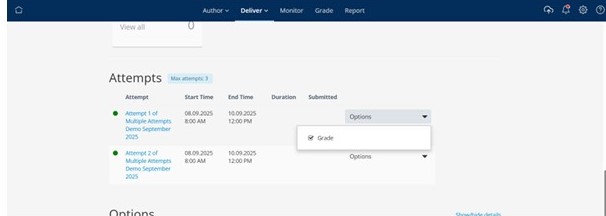
We are changing the way child tests are displayed in the Deliver and Grade modules to help make the lists of tests less cluttered. Previously each child test, the individual attempts, were displayed in addition to the Parent test. This will now change so that the child tests are not displayed separately in the list of tests when in Deliver and Grade. To access the specific child test, you will need to select the parent test and the child tests will be listed there, this video provides a demonstration.
One important implication to note from this change is that to access the grading options for a child test, you will need to select the Grade option from the child tests within the parent, see screen shot below (and also demonstrated in the video).
Useful links and Inspera Support Information
Inspera support links:
- Inspera landing page – Teaching Knowledge Base – https://teach.coventry.domains/inspera/
- Introducing Inspera – OTL Staff Portal
- Inspera Help Centre
- Inspera site for Students
- Includes videos demonstrating the Candidate Dashboard and link to a generic demo test
- Inspera Roll Out Plan 2025-26
