
Inspera Update – March 2025
Colleagues, in this March Inspera update there is information on two new question types in Inspera, guidance on managing notifications from Inspera and reminders on naming conventions and accessing the Test and Production tenancies.
Inspera Updates
Inspera have introduced two new question types. We have activated these on the Test tenancy initially, https://coventrytest.inspera.com/admin. This will provide an opportunity for you to explore these question types and feedback before activating more widely.
The two new question types are:
- Audio Record – this manually marked question allows students to record audio and listen back to the recording, with the option to re-record, before submitting.
- For more details see – https://support.inspera.com/hc/en-us/articles/360045324592-Question-type-Audio-record
- Code Compile – this automatically marked question is a question allows the student to write code, which is automatically compiled and run and validated against test cases defined by the Author. There are a range of programming languages which can be selected.
- For more details see – https://support.inspera.com/hc/en-us/articles/360039319172-Question-type-Code-compile
We would welcome any feedback on these new question types to help inform future activation. Please send any feedback to Martin Jenkins – ab5926@coventry.ac.uk
The full details of Inspera’s March updates (and all previous updates), which also included some enhanced accessibility features, can be accessed from https://support.inspera.com/hc/en-us/sections/360003530672-Product-updates. Recordings of the monthly update webinars are also available.
Managing Inspera notifications
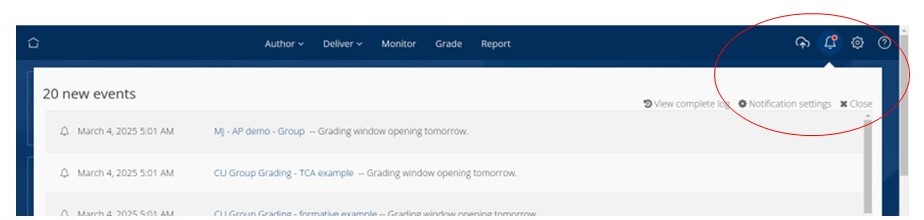
Notifications are available on a wide range of events from Inspera. Some colleagues have fed back that it can generate a lot of email traffic. You can manage the notifications you receive from Inspera by clicking on the bell icon (top right) and selecting ‘Notification Settings’.
Naming Conventions
Through semester 1 we had nearly 50k student submissions on Inspera. This activity has the potential to contribute to the student engagement monitoring undertaken by the University. For this data to have value in this way does require tests to be named according to the naming conventions that have been shared.
Your support in ensuring your test is named appropriately is therefore important to support this important engagement monitoring activity. In addition, using the naming conventions will help you in locating and re-using questions and question sets by ensuring they are clearly differentiated and identifiable.
Your test names must include:
- module code
- component and assessment
- whether formative or summative
- semester and year
The Inspera naming conventions are set out in this article – Inspera Naming Conventions. These are aligned with the Coventry University Group Assessment Naming format for AULA and INSPERA assessment links
Inspera Test and Production tenancies
We have two tenancies (or servers) for Inspera. The Test tenancy is staff only access and we recommend this tenancy is used as your sand-pit space for Question Set development; it is the space you are given access to after attending the Getting Started session. Students do not have access to this space so please do not set up tests on this tenancy.
The Production tenancy (or server) is used for delivery of tests to students and should be used just for delivery of assessments. If you do not yet have access to the Production tenancy use the form in the box below to request access.
| Test tenancy Staff login – https://coventrytest.inspera.com/admin#home There is no student access to the Test tenancy. The Test tenancy is a staff only space which should be used as a sand-pit for colleagues to explore the use of Inspera and build Question Sets ready for delivery. | Production tenancy Staff Login – https://coventryassessment.inspera.com/admin#home Student direct login – https://coventryassessment.inspera.com/ Assessments, formative and summative, will be delivered to students using the Production tenancy. If you do not have access to the Production server then please fill in this form: Access Request – Inspera Production Server. and they will help set you up on the Production tenancy. |
Useful links and Inspera Support Information
Inspera support links:
- Inspera landing page – Teaching Knowledge Base – https://teach.coventry.domains/inspera/
- Introducing Inspera – OTL Staff Portal
- Inspera Help Centre
- Inspera site for Students
- Includes videos demonstrating the Candidate Dashboard and link to a generic demo test
- Inspera Roll Out Plan 2024-25
