
Inspera update – October 2025
Inspera Update October 2025
Colleagues, for the October 2025 Inspera updates the main area of focus was latest developments on Item Banks. An overview of those changes and details of opportunities to join an Inspera Masterclass on Item Banks is provided below. This update also provides reminders on ensuring we use the Naming Conventions, which have been updated to reflect Block delivery; Summary Page information for multiple attempt tests; and a reminder on using the Aula LTI integration with Inspera.
Item Banks
Item Banks are a major Inspera update which have been the focus of their development over the past few months. We are provisionally planning to switch on Item Banks in January 2026 and will be running update sessions nearer that time. We are focused now on establishing the Item Bank structure that we will have when we switch this feature on. For now, the most important preparation step is to ensure all your assessment content (Questions, Question Sets and Tests) are clearly and distinctly named. There will be greater visibility of assessment content within Item Banks and so having names that you can easily search on to be able to reuse your content is going to be important going forward.
The features that were released in the October update were:
- Item Bank Health Suite – using AI to provide automated checks and insights into the health of questions, making it easier to identify issues and enhance reliability when creating questions and question sets.
- Custom User Roles – access to Item Banks will be through Access Groups, which control the permissions specific users might have. It will now be possible to customise the permissions of users including providing view only access. This will start to allow External Examiner’s to be added to Inspera.
- Custom metadata – we will be able to create custom meta data which is available to all Item Banks (one possible use would be Graduate Attributes for example) or be specific to individual Item Banks.
If you are interested in learning more about Item Banks, Inspera are running some ‘Masterclass’ sessions. The dates of the sessions are listed below with links to register.
- 21 October 2025 11am-12noon UK: https://inspera.wistia.com/live/events/rrwa0ugviv?utm_campaign=ame
- 22 October 2025 11am-12noon UK: https://inspera.wistia.com/live/events/o5xmbmh52n?utm_campaign=ame
- 13 November 2025 11am-12noon UK: https://inspera.wistia.com/live/events/h2pwvv4y0k?utm_campaign=ame
Naming Conventions
As indicated above with the forthcoming move to Item Banks it will be increasingly important that all assessment content is clearly named. The Coventry University Group Naming Conventions have also been updated to take account of Block delivery. Adhering to these conventions will help in locating and re-using questions and question sets by ensuring they are clearly differentiated and identifiable.
Ensuring your assessments are appropriately named is also essential to support the Student Engagement analytics work the University is undertaking. Inspera data is being used alongside other sources to help monitor student engagement, to ensure this information can be used your assessments must use the specified naming convention which includes module code, whether the assessment is summative or formative and the block or semester it is running in.
The naming conventions are set out in this article – Inspera Naming Conventions.
Student access to the Summary Page when reviewing their submission.
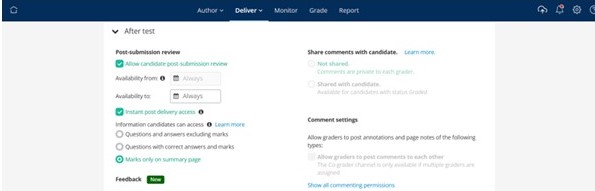
A reminder that it is now be possible to allow students access to the Summary Page after each attempt, when using multiple attempts. This will show students the score they achieved for each question, so they see which questions they got correct, partially correct, wrong or which were unanswered. This option will not show the students the detail of the question.
The new feature is available as an option in the After Test area; to enable this feature under the Post Submission Review section in After Test, you will need to enable Post Submission Review, Instant Post Delivery Access and Marks only on summary page. See screen shot below or view this video:
Aula-Inspera Integration
The recommended way to set up an Inspera test is to use the integration from Aula. There are two integration options from Aula. One from the Aula Assignment block, this is the recommended option for most assessments as it pulls students through from Aula and passes the grades back. The other integration, where links can be added to content pages in Journey > Materials, should only be used for formative tests.
A reminder of the differences between the two integrations:
- Assignment Block integration
- Provides grade pass back to Aula
- Students are pulled through from Aula to Inspera, so where students need additional time this can be added before they start the assessment (see note below on pulling through students).
- This integration must be used for summative assessments and is recommended for most tests (formative or summative)
- Journey > Materials integration
- This integration must only be used for formative assessments as it does not provide grade pass back to Aula. In addition students are not pulled through from Aula to Inspera.
An article that sets out how to set up the integrations, including video demonstrations is available on the Teaching Knowledge Base – Aula -Inspera Integration.
